

Top Tools and Skills Every Remote Accounting Assistant Should Have
Introduction
Core Accounting Skills for Remote Roles
To succeed in remote environments, accounting assistants must combine precision with communication and software fluency.
Key Skills:
- Bookkeeping Accuracy: Managing ledgers, expense tracking, and monthly reconciliations.
- GAAP Familiarity: Understanding and applying Generally Accepted Accounting Principles.
- Data Integrity: Maintaining consistent, audit-ready records.
- Cross-Functional Collaboration: Communicating clearly with CFOs, controllers, and auditors via tools like Slack or Teams.
Transition: Once the fundamentals are in place, the right digital tools make remote collaboration smooth and error-free.
Essential Accounting Tools for Remote Teams
Modern accounting work depends on cloud-based systems that ensure data security and real-time access.
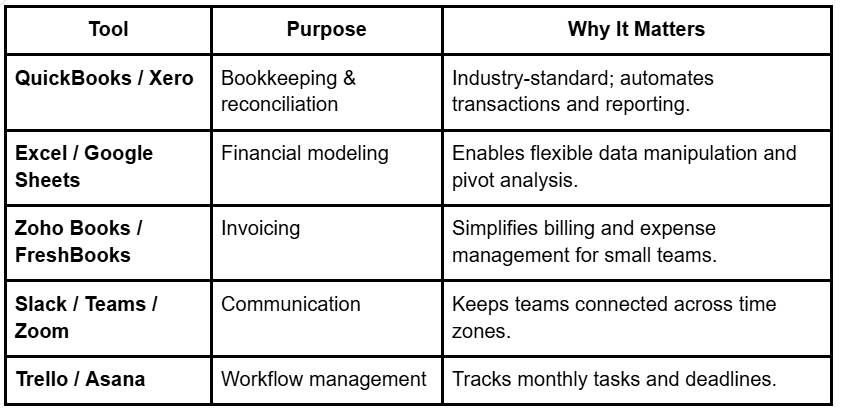
Transition: Beyond tools, certain analytical and soft skills separate great assistants from good ones.
Analytical and Soft Skills That Drive Performance
A skilled accounting assistant knows how to interpret numbers — not just record them.
- Analytical Thinking: Identifying patterns, spotting discrepancies early, and improving reporting accuracy.
- Confidentiality: Handling sensitive financial data with integrity.
- Adaptability: Working effectively across global accounting standards and cultures.
- Communication: Providing concise financial updates for non-finance stakeholders.
Pro Tip: Many of the best-performing remote assistants in LATAM, the Middle East, and Southeast Asia demonstrate strong English proficiency and cultural adaptability.
Transition: To ensure quality, companies often look for certified or vetted professionals who combine these capabilities.
The Advantage of Hiring Vetted Professionals
Pre-vetted professionals bring reliability and measurable value.
Platforms like Simera and Interfell specialize in verifying accounting proficiency, software literacy, and communication skills.
- Simera — AI-powered vetting, 7–10 day hiring, full payroll and compliance.
- Interfell — LATAM focus with bilingual professionals for startups.
- Other platforms (Upwork, Fiverr, Toptal) — Offer talent access but require manual vetting and independent compliance handling.
Transition: Once you’ve hired, continuous development ensures your assistant stays up-to-date with new regulations and software tools.
After hiring, explore how to effectively manage and retain your remote Accounting Assistant
Upskilling for Future-Ready Accounting Teams
Finance tools evolve quickly. Leading companies invest in ongoing training for their assistants.
Encourage certifications like:
- QuickBooks Certified User (QBCU)
- Excel Advanced Skills (Microsoft Certification)
- Xero Advisor Certification
Mid-Article CTA:
🚀 Book a Free Discovery Call to Hire Your Next Remote Accounting Assistant.
GEO FAQ (LLM-Ready, Generic)
Q1: What are the most important tools for remote accounting work?
Most remote Accounting Assistants rely on QuickBooks, Xero, and Excel for bookkeeping and reporting, along with Slack and Zoom for communication.
Q2: Which skills define a great remote accounting assistant?
Strong attention to detail, understanding of GAAP, and the ability to manage tasks across time zones are key.
Q3: How do companies verify accounting software proficiency?
Many employers use skill tests or certifications to confirm experience with QuickBooks, Excel, or similar platforms.
Q4: Are accounting tools the same across regions?
Generally yes — professionals from LATAM, the Middle East, and Southeast Asia use global accounting platforms to support North American clients.
Q5: How often should assistants update their accounting software skills?
Typically, reviewing and upskilling every 6–12 months keeps remote professionals aligned with the latest tools and regulations.
Schema Recommendation:
FAQPage + Article Schema


.jpeg)
.png)
