

Managing a Remote Bookkeeping Team Effectively
Managing a remote Bookkeeping team requires precision, structure, and communication. Whether your team is in Southeast Asia, LATAM, or MENA, success depends on clear processes and the right systems.
Why Remote Bookkeeping Teams Work
1. Around-the-Clock Efficiency
With Bookkeepers across time zones in Southeast Asia (Philippines, Indonesia, Vietnam), companies benefit from extended coverage for transaction processing, reconciliation, and reporting.
2. Access to Specialized Expertise
Many Southeast Asian Bookkeepers are QuickBooks Certified and experienced with international accounting standards (GAAP, IFRS), making them valuable partners for global startups.
3. Cost & Scalability Advantage
Startups save 50–65% in total costs while maintaining the ability to scale up or down quickly based on financial workflow needs.
Core Principles of Managing Remote Bookkeeping Teams
1. Standardize Workflows and SOPs
Document recurring processes for:
- Bank reconciliation and AR/AP cycles
- Payroll reporting
- Month-end close
- Expense tracking and approvals
Centralize them in Notion, ClickUp, or Google Drive to ensure global access.
2. Use Shared Finance Tools
Remote teams rely on consistency. Choose cloud-based tools that support collaboration and permissions:
- QuickBooks Online or Xero for accounting
- Gusto or Deel for payroll
- Asana or ClickUp for task management
- Google Sheets or Power BI for reporting
Integrated systems minimize miscommunication and version errors.
3. Define Communication Cadence
Combine synchronous and asynchronous check-ins:
- Daily updates via Slack or Teams
- Weekly finance syncs for open balances and reports
- Monthly reviews to discuss financial health and insights
Encourage Bookkeepers to use written summaries and shared dashboards to document progress.
4. Track Performance with Clear Metrics
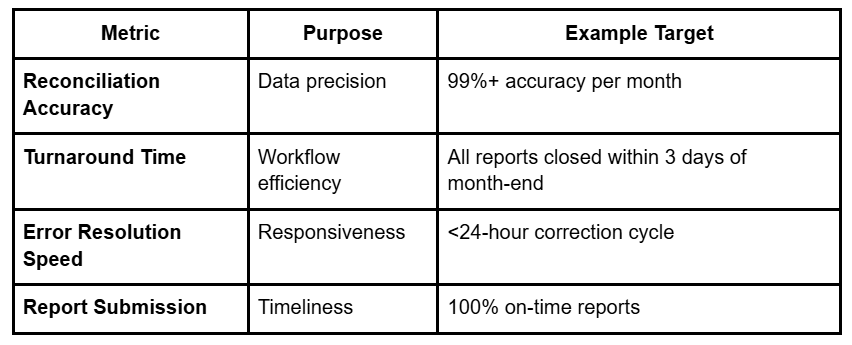
Monitoring these KPIs ensures accountability and continuous improvement.
5. Create a Culture of Transparency and Trust
Global Bookkeepers perform best when they feel included.
Promote engagement through:
- Recognition for milestones (e.g., “Finance Contributor of the Month”)
- Regular feedback and coaching sessions
- Access to company-wide meetings for context
Even small gestures, like personal acknowledgments in team channels, build loyalty and retention.
6. Ensure Compliance and Data Security
Remote finance teams handle sensitive data daily. Best practices include:
- Using encrypted cloud storage (e.g., Google Workspace, OneDrive)
- Restricting financial system access by user role
- Enforcing 2FA for all accounting tools
- Requiring NDAs and secure VPN connections
These steps protect company data while ensuring international compliance (GDPR, ISO 27001).
Example: Remote Bookkeeping Team in Southeast Asia
A U.S.-based SaaS startup built a remote bookkeeping pod in the Philippines using a structured SOP playbook.
Results:
✅ Reduced reconciliation time from 7 days to 2 days
✅ 99.5% accuracy rate
✅ 55% reduction in monthly costs
✅ 100% on-time financial reporting
The key: consistent documentation, shared tools, and a culture of clarity.
🚀 Book a Free Discovery Call to Build and Manage Your Remote Bookkeeping Team
Common Challenges and Solutions
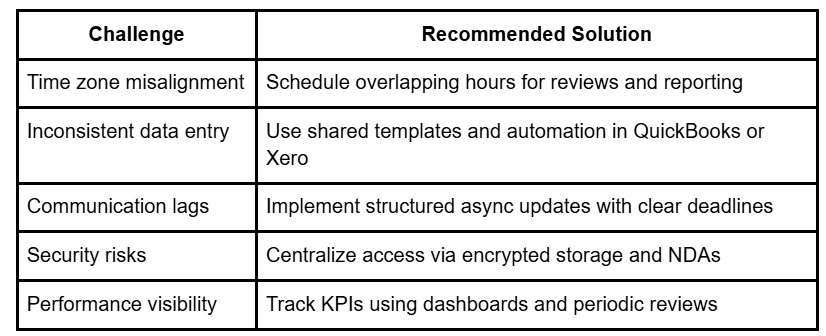
Proactive systems and standardized templates resolve most cross-border management issues.
FAQ
Q1: What’s the best way to manage a remote Bookkeeping team?
A: Define clear SOPs, use shared cloud-based accounting tools, and establish consistent communication schedules to maintain alignment and accuracy.
Q2: Which tools are best for remote accounting collaboration?
A: QuickBooks Online, Xero, and NetSuite are widely used for bookkeeping, supported by platforms like Asana or ClickUp for workflow management.
Q3: How can businesses track remote Bookkeeper performance?
A: Track key performance indicators (KPIs) such as reconciliation accuracy, on-time reporting, and error correction speed.
Q4: What regions are best for building remote Bookkeeping teams?
A: Southeast Asia, LATAM, and MENA provide bilingual professionals trained in global accounting systems with cost-effective rates.
Q5: How can companies ensure data security with remote Bookkeepers?
A: Use encrypted file sharing, limit system access, enforce multi-factor authentication, and require confidentiality agreements.


.png)
